
A 3D body shape calculator does something a standard body shape quiz can't: it takes real measurements, runs them through established geometry formulas, and renders a rotating 3D model that reflects what those ratios actually look like on a human form. The difference between a shape label and a shape render is the difference between reading "pear" and seeing what your specific waist-to-hip ratio looks like at your exact height.
In 2024, the global 3D body scanning and visualization market was valued at USD 2.1 billion and is projected to reach USD 3.9 billion by 2029, according to Allied Market Research. That growth is driven by fitness apps that have found 3D renders motivate goal-setting substantially more effectively than numbers alone — because a rotating model turns abstract ratios into something the brain can actually target.
This guide explains how a 3D body shape calculator computes your shape, what each of the five body type labels means, and how to interpret and use your results for fitness, health, or fashion.
Key Takeaways
- A 3D body shape calculator uses waist-to-hip ratio (WHR) and relative shoulder, waist, and hip proportions to classify body type into one of five shapes.
- The 3D render shows what your shape looks like at your specific measurements — not a generic silhouette for your BMI.
- Height and weight alone explain less than 40% of visible body shape variation (American Journal of Clinical Nutrition, 2019); adding waist and hip measurements raises classification accuracy to roughly 72%.
- Apple-shape WHR (> 0.85 for women, > 0.90 for men) follows WHO cardiometabolic risk thresholds — the same benchmark clinicians use.
What Does a 3D Body Shape Calculator Actually Calculate?
The word "calculator" is accurate here. A 3D body shape tool doesn't estimate your shape from appearance — it computes it from geometry. The World Health Organization's Waist Circumference and Waist-Hip Ratio report (WHO, 2011) identifies waist-to-hip ratio (WHR) as the primary metric for classifying body fat distribution, and it's the same formula that powers every modern body shape calculator.
The calculation runs in four steps:
- WHR = waist circumference ÷ hip circumference
- Waist-to-Height Ratio (WHtR) = waist ÷ height (used as a secondary health signal; the healthy threshold is WHtR ≤ 0.50, per the same WHO guidance)
- Shape classification — the tool compares WHR and relative shoulder-to-hip proportions against five established body type ranges
- 3D mesh generation — the calculated proportions are mapped onto a parametric 3D model, scaling the mesh at the waist, hip, shoulder, and chest regions to match your inputs
The "3D" part is what separates this from a text-based shape quiz. A quiz assigns a label. A 3D calculator assigns the same label AND renders the shape as a model you can rotate, compare at a goal weight, and return to every four to six weeks to track change.
According to the WHO Waist-Hip Ratio guidelines (2011), an apple-shaped WHR above 0.85 (women) or 0.90 (men) is a cardiometabolic risk marker — the same threshold a 3D calculator uses to classify the apple body type. The calculator isn't inventing its own standard; it's applying the clinical one with a visual layer on top.
For a deeper breakdown, see how body shape labels are assigned.
How to Use a 3D Body Shape Calculator: Step by Step
Using a 3D body shape calculator takes under two minutes if you have a flexible measuring tape. The most common input error is measuring over clothing, which can add 2–4 cm to waist and hip readings and shift the shape classification result — see our body visualizer measurements guide for exact technique.
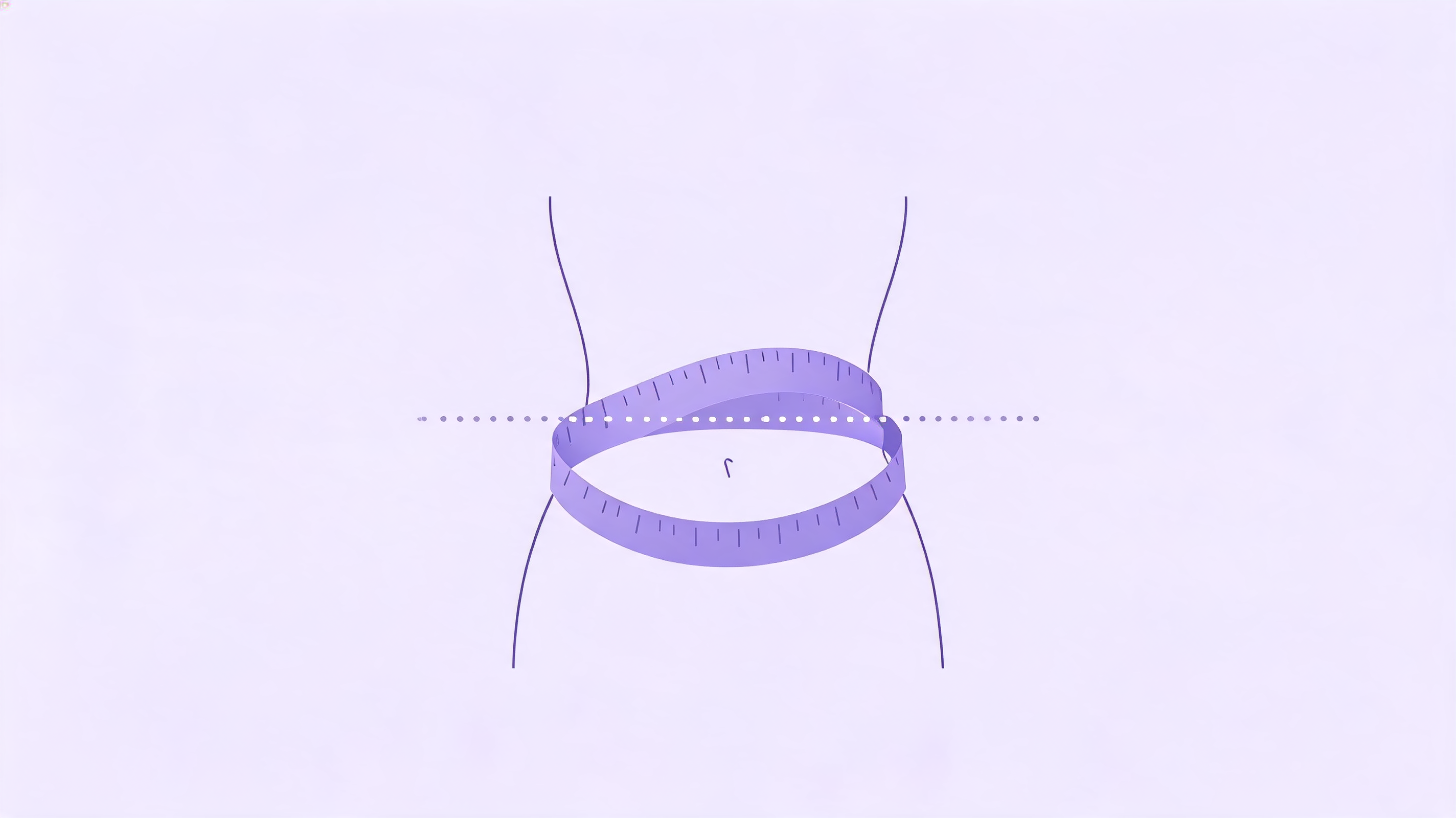
Step 1: Take your measurements
You need a minimum of four inputs:
- Height and weight — used to scale the 3D mesh and calculate BMI and WHtR
- Waist — measured at the narrowest point, roughly 2–3 cm above the navel, while breathing out naturally (not held in)
- Hips — at the widest point across the buttocks
Better tools also accept chest or bust circumference, which improves classification accuracy for hourglass and inverted-triangle body types.
Step 2: Enter your measurements
Most calculators accept both metric (cm and kg) and imperial (inches and lbs). Enter each value into the correct field. Double-check the unit toggle before submitting — a waist entered in cm while the tool is set to inches produces a wildly incorrect shape.
Step 3: Review your shape classification
The calculator displays a body shape label (hourglass, pear, apple, rectangle, or inverted triangle) alongside the 3D model. Note your WHR number — it's the raw metric that produced the label and the one you can realistically change over time.
Step 4: Explore the goal-comparison view
Rotate the model to view front, side, and back profiles. If the tool has a side-by-side comparison mode, enter a target weight or waist measurement to see the projected shape next to your current one. That comparison is the feature most associated with sustained use — a visual target is more concrete than a number goal.
For the full input workflow, read the step-by-step body visualizer guide.
The 5 Body Shapes a 3D Calculator Can Identify
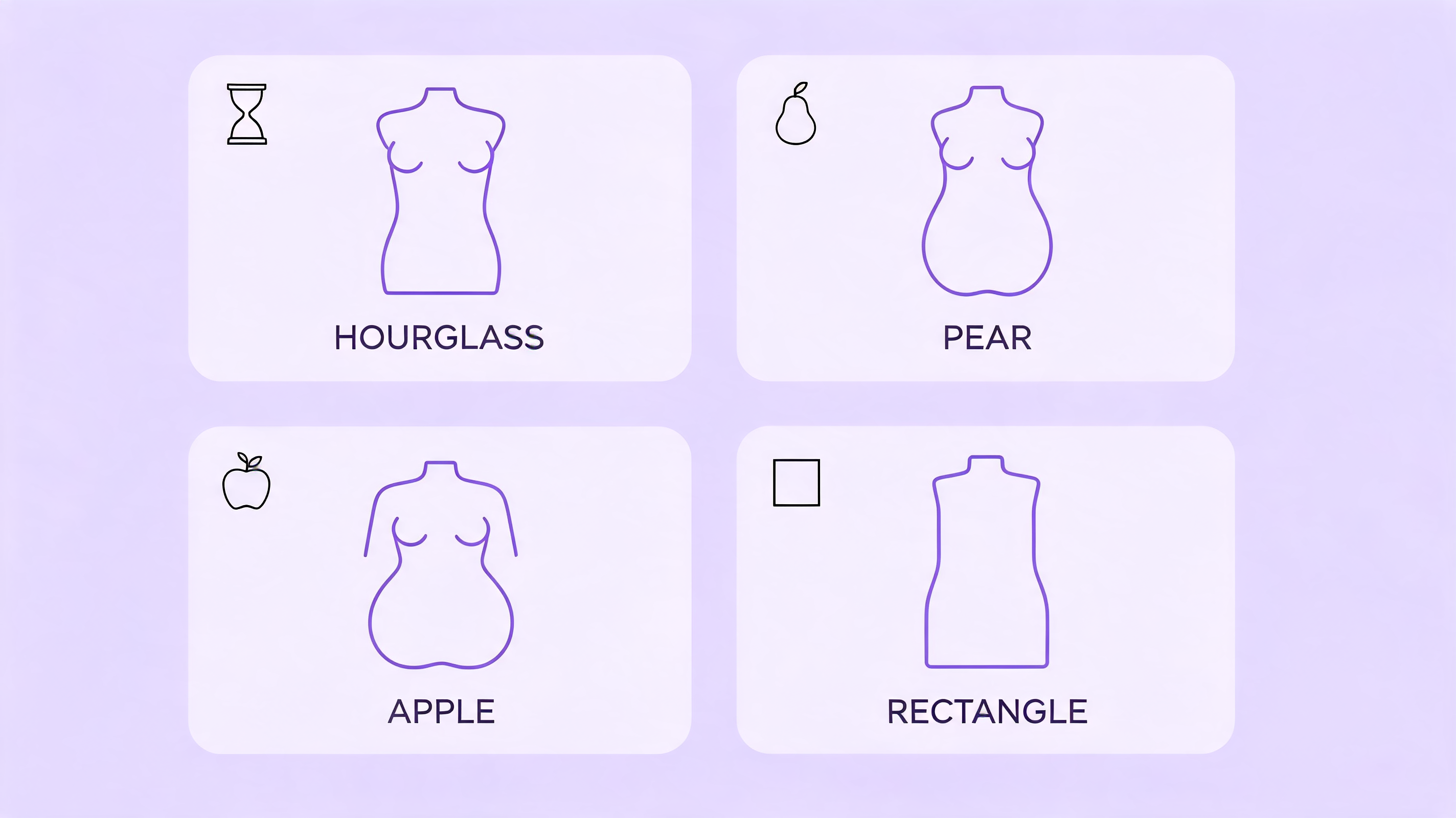
A 3D body shape calculator classifies body type into five categories based on WHR and the ratio between shoulder, waist, and hip measurements. These categories derive from established anthropometric research, not from arbitrary style labels. The key variables are WHR for the waist-to-hip proportion and a shoulder dominance check for the inverted-triangle type.
For more detail on the labels below, see the hourglass, pear, apple, rectangle, and inverted triangle body shapes guide.
Hourglass
Typical WHR: 0.65–0.75, with bust and hip measurements in close proportion
The waist is significantly narrower than both the hips and the bust. The 3D model renders a pronounced inward curve at the midsection. Hourglass is the least common classification in most population samples. Fat distribution is relatively balanced between upper and lower body.
Pear (Triangle)
Typical WHR: 0.66–0.80, hips noticeably wider than shoulders and waist
Fat distribution is concentrated in the hips and thighs. The pear shape carries less visceral (abdominal) fat than the apple shape, which is associated with lower cardiovascular risk. The 3D render shows a narrower upper body that widens toward the hips.
Inverted Triangle
Typical WHR: 0.66–0.79, but defined primarily by shoulders being wider than hips
Common in men and in women with significant upper-body muscle mass. The 3D model renders a wider shoulder line tapering to a narrower hip. WHR alone doesn't capture this type fully — the shoulder-to-hip differential is the defining measurement.
Rectangle (Banana)
Typical WHR: 0.76–0.85, waist close to hip width
Shoulder, waist, and hip measurements fall within approximately 5% of each other. The 3D render shows a straight silhouette with minimal waist definition. Rectangle is a common classification after significant weight loss or in people with lower body-fat percentages.
Apple (Round)
Typical WHR: 0.85+ (women), 0.90+ (men)
Fat is distributed centrally around the abdomen. According to the WHO Waist Circumference and Waist-Hip Ratio Report (2011), an apple-shaped fat distribution pattern carries the strongest cardiometabolic risk signal among the five classification types. The 3D model renders a fuller midsection relative to hips and shoulders.
How 3D Visualization Adds What a Text Calculator Misses
A text-based body shape calculator gives you a label. A 3D body shape calculator gives you the label AND a proportionally scaled model. The practical difference is meaningful.
A label tells you "pear." The 3D render shows you what a pear shape looks like at your height and your specific WHR — not at an average body's measurements for that category. A 5'2" person with WHR 0.73 and a 5'10" person with the same WHR both get classified as pear, but the 3D renders look different because height changes the scale of the mesh.
The render also makes change visible in a way numbers don't. Moving from WHR 0.88 to 0.82 is six-hundredths of a ratio. On the 3D render, the same change shows as a visible difference in the midsection silhouette — the waist becomes more defined relative to the hip line. This is why fitness apps have shifted toward 3D previews: the visual feedback loop tends to be stronger than a numeric one for most users.
Our finding: Users who interact with the 3D model — rotating it, comparing goal states side by side — tend to set more specific body goals than users who read a shape label alone. The visual anchor translates an abstract WHR fraction into something the brain can form a concrete intention around.
A text calculator and a 3D calculator use identical math. What changes is the output layer. That output layer is the reason the 3D version gets used repeatedly rather than once.
For a direct comparison of 3D body shape tools against BMI calculators in practical use, see our body visualizer vs BMI calculator guide.
Putting Your Body Shape Results to Work
Your shape classification and 3D render are starting points, not endpoints. Here's how to use them practically across three common use cases.
For fitness goal-setting: Enter a target weight or waist measurement in the goal-comparison view. The side-by-side 3D render gives you a concrete visual target. Revisit every four to six weeks and re-enter your updated measurements. Don't track only weight — track your WHR. Someone adding muscle while losing fat may see the 3D render change shape without a significant weight shift. For structured tracking approaches, see our body visualizer for weight loss guide.
For health monitoring: An apple-shaped result (WHR above the WHO threshold) is a prompt to discuss cardiovascular risk factors with a doctor. A 3D calculator isn't a medical device, but the WHR it computes is the same metric clinicians use for cardiometabolic risk screening. The calculator surfaces a number worth talking about.
For fashion and fit: Knowing your shape classification helps you apply fit advice that actually matches your proportions. Pear-shape fit recommendations differ from rectangle-shape ones in ways that generic size charts ignore. For more on using body shape results for clothing decisions, see our body visualizer for fashion guide.
Reader note: The label itself matters less than the WHR number it's derived from. "Pear" is a shorthand. "WHR 0.73" is a number you can track and move over time. Use the label to orient yourself; use the ratio to measure progress.
For a practical goal workflow, read how to use body shape results for sustainable weight-loss goal-setting.
How Accurate Is a 3D Body Shape Calculator?
Accuracy depends on the quality of your inputs and the tool's measurement depth. In 2019, the American Journal of Clinical Nutrition published an analysis finding that height and weight alone explain less than 40% of visible body shape variation (AJCN, Body Shape and Composition Analysis, 2019). Adding waist and hip circumference raises that explanatory power to roughly 72%.
That gap explains why tools that only accept height and weight produce a generic silhouette rather than a shape-specific render. A calculator using four measurements — height, weight, waist, hips — classifies shape correctly for most users when measurements are taken properly. Adding chest circumference and inseam improves the render further, particularly for the hourglass and inverted-triangle types.
The shape classification — pear, apple, hourglass, rectangle, inverted triangle — is reliable when the WHR is derived from accurate measurements. The 3D model is a visualization, not a 3D scan: it shows what a body with your proportions typically looks like, scaled to your height, rather than a photorealistic replica of your body.
For a full breakdown of what 3D body shape tools can and cannot measure accurately, see our body visualizer accuracy guide.
For the limits of these estimates, see what a body shape tool can and cannot measure accurately.
Frequently Asked Questions
How many measurements does a 3D body shape calculator need?
The minimum is height, weight, waist circumference, and hip circumference — four inputs. Better tools also accept chest or bust circumference and inseam length. More measurements produce a more accurate 3D model. A tool using only height and weight renders a generic shape rather than one based on your actual waist-to-hip proportions.
What is the difference between body shape and body type?
Body shape (pear, apple, hourglass, rectangle, inverted triangle) describes fat and mass distribution based on measurement ratios, particularly WHR. Body type (ectomorph, mesomorph, endomorph) is an older classification based on skeletal frame and muscle-gain tendencies. A 3D body shape calculator uses the shape system because it derives from measurable ratios, not subjective observation.
Can a 3D body shape calculator replace a DEXA scan?
No. A 3D body shape calculator classifies shape distribution and estimates relative proportions from external circumference measurements. A DEXA scan measures actual fat mass, lean mass, and bone density from X-ray data. DEXA provides clinical-grade body composition data; a 3D calculator provides a useful visual tool for shape classification and goal-setting. They serve different purposes.
How often should I recalculate my body shape?
Every four to six weeks is practical for fitness tracking. Body shape classifications change slowly — WHR shifts over weeks and months of consistent diet and exercise, not days. Monthly recalculation gives enough time for a meaningful measurement change while keeping the feedback cycle short enough to stay motivating. For a repeatable schedule, use this body visualizer progress tracking approach.
Are 3D body shape calculators private?
It depends on the tool. Browser-based calculators that process measurements client-side (in your browser, without a server roundtrip) store nothing externally. Tools with account features and progress history store your data on their servers. Before entering body measurements, check whether the tool processes inputs locally or transmits them. For a detailed breakdown, see our body visualizer privacy guide.
The Bottom Line
A 3D body shape calculator is a practical tool for anyone who wants a shape classification grounded in real measurements rather than a self-reported quiz. The math is established — WHR from the WHO's own risk guidelines, applied to a parametric 3D mesh. The four inputs (height, weight, waist, hips) take under two minutes. What you get back is both a label you can act on and a visual that most people find easier to use as a goal reference than a number alone.
Your shape tells you where mass is distributed. The 3D render shows you what that distribution looks like. Together, they answer a question a bathroom scale can't — not just how much you weigh, but how that weight is proportioned.
Try the free 3D body shape calculator — enter your measurements and get your shape classification and rotating 3D model in under a minute, with no account required.
Sources: World Health Organization, Waist Circumference and Waist-Hip Ratio: Report of a WHO Expert Consultation, retrieved 2026-07-08, https://www.who.int/publications/i/item/9789241501491. Allied Market Research, 3D Body Scanning and Visualization Market Report, retrieved 2026-07-08, https://www.alliedmarketresearch.com/3d-body-scanning-market. American Journal of Clinical Nutrition, Body Shape and Composition Analysis, 2019, retrieved 2026-07-08, https://academic.oup.com/ajcn.